Making an online booking request is very straightforward. Once you have made your online booking request the following will happen quite quickly:
- You will receive an email confirming that the Ewell Hall Manager has been made aware of your booking request.
- The Ewell Hall Manager will check the detail of your booking request and will process it. Provided there are no problems, a booking confirmation will be generated (subject to payment) and an invoice. You will be contacted by email, or occasionally by telephone, if additional information is needed or there are problems with the request.
- The email covering the invoice will provide Ewell Hall’s bank account details for your payment. Please pay the invoice (covering the charge and security, damage and cleaning deposit) within seven days of a booking being made and use your invoice number as your payment reference.
- A receipt for the payment will be emailed to you once it has been received in the Ewell Hall bank account.
- A final email will be sent to you seven to ten days before your event with the unique access code for getting into Ewell Hall and a reminder list of do’s and don’t’s when using the hall. (This will also provide a prompt to ask for the cafe to the hall’s sound system if you want to use it).
That’s it! Send out your invites and prepare to enjoy your event or activity.
To make your online booking request please follow these steps:
Go to our Hall Calendar page to view hall availability and existing bookings. Ewell Hall uses the Hallmaster online booking system to manage our bookings. You will see a view of the calendar like the image below:
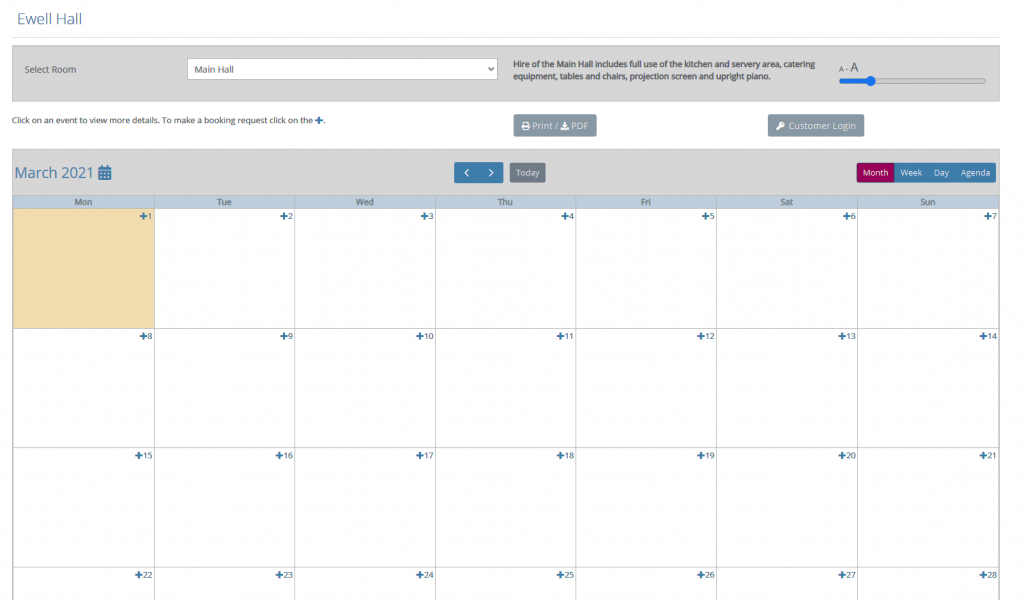
Look for the date you need and click on the + symbol next to that date to make a booking request.
If you have not used the online system before you will need to set up yourself, your business or organisation, as a Ewell Hall customer on the Hallmaster site as part of making your first booking request. If you are a returning customer you will be able to go straight to making a booking request, or check on your existing bookings and invoices, by logging into Hallmaster on the Hall Calendar page.
See above for details of the main steps in the booking process once your booking request has been submitted. Fuller details can be found in the Hallmaster Customer User Guide.
If, for any reason, you are unable to use the online booking system then you may still, if you wish, visit the Hall Calendar page to check availability before contacting Nick McInnes, the Ewell Hall Manager, by email at info@ewellhall.uk or by phone on 020 8614 0714.
Times available
Ewell Hall is available for bookings between 07:30am and 11:00pm. The minimum booking period is one hour. Overnight bookings are not permitted. Out of consideration for our neighbours, loud music – that can heard outside the hall – may not be played after 10:30 pm.
Bookings must include the time needed for setting up an event and clearing up afterwards. Access to the hall will not be permitted outside the hours booked and paid for.
The Hirer
Hirers must be aged 21 or over. In completing the booking request, you become “the Hirer” and accept personal responsibility for complying with the Ewell Hall Terms and Conditions. This responsibility cannot be assigned or delegated to anyone else, and sub-letting is not allowed.
Suitable events
Ewell Hall is considered suitable for a wide range of events and activities for families, organisations and businesses. Bookings for 13th and 14th birthday parties are currently being accepted on a trial basis. Bookings will not be accepted for other teenage birthday parties, 21st birthday parties or Halloween parties.
Other booking conditions
For full details of other booking conditions please ensure you have read the Ewell Hall Terms and Conditions, together with all other information in the Documentation section on this website.